Rajnish Noonia

Author: Rajnish Noonia

  • Configure .Net RIA Service – hosted on shared domain

    1.Mark “copy to local” these 3 assembly in your web project:
    1) System.Web.DomainService
    2) System.Web.Ria
    3) System.ComponentModel.DataAnnotations

    This will deploy above mentioned assemblies in you bin folder

    Test your web service via like
    http://www.yoursite.com/virDir/namespace-Web-AuthenticationService.svc
    where namespace.Web.AuthenticationService is your RIA domain service.
    Internally at runtime RIA replaces . with –
    Here you will get error as “This collection already contains an address with scheme http. There can be at most one address per scheme in this collection.”

    2.Add following code to your web.config
    <serviceHostingEnvironment aspNetCompatibilityEnabled=”true”>
    <baseAddressPrefixFilters>
    <add prefix=”http://www.yoursite.com”/&gt;
    </baseAddressPrefixFilters>
    </serviceHostingEnvironment>

    You also need to change the service reference inside your Silverlight code to point to the service with an absolute address. Following is a sample that I used in my application:
    3. open file Namespace.Web.g.cs in hidden folder Generated_Code under silverlight project.
    Replace UriKind something like new Uri(“namespace-Web-UserRegistrationService.svc”, UriKind.Relative) to new Uri(“namespace-Web-UserRegistrationService.svc”, UriKind.Absolute)

    Try to re run your service url you will now get error “IIS specified authentication schemes ‘Basic, Anonymous’, but the binding only supports specification of exactly one authentication scheme. Valid authentication schemes are Digest, Negotiate, NTLM, Basic, or Anonymous. Change the IIS settings so that only a single authentication scheme is used.”

    4.Reduced your site’s authentication to “Anonymous” and everything worked great. The exact details on how you do this vary from ISP to ISP

    Microsoft is still working on this and will soon (hopefully) fix the issue’s in further release of ria services.

  • Configuring RIA to use roleManager, membership and profile.

    Create Silverlight Project “Business Navingation application” in Visual Studio 2010 Beta 2 and configure SQL express database to generate schema for rolemanager, membership and profile feature using command

    Launch Visual Studio Command prompt (Run as administrator)
    Type command
    Aspnet_regsql.exe –E–S sqlinstance–A rmp
    This will create sql express database aspnetdb

    Visit links to see how to configure components mentioned above

    Configure Role Manager
    Configure Membership Manager
    Configure profile Manager

    Edit web.config file as
    <configuration>
    <!– Connection to database (also used by rolemanager,membership manager and profile manager) –>
    <connectionStrings>
    <add name=”SQLDataSource” connectionString=”Data Source= .SQLExpress;Initial Catalog=aspnetdb;Integrated Security=SSPI;” />
    </connectionStrings>
    ……
    <!– Configure Role Manager (See : http://msdn.microsoft.com/en-us/library/ms998314.aspx)–>
    <roleManager enabled=”true” defaultProvider=”SqlDataRoleProvider”>
    <providers> <clear />
    <add name=”SqlDataRoleProvider”
    type=”System.Web.Security.SqlRoleProvider”
    connectionStringName=”SQLDataSource”
    applicationName=” APPName ” />
    </providers>
    </roleManager>
    <!– Configure Membership Manager (See : http://msdn.microsoft.com/en-us/library/ms998347.aspx)–>
    <membership defaultProvider=”SqlDataMemberProvider” userIsOnlineTimeWindow=”1″>
    <providers> <clear />
    <add name=”SqlDataMemberProvider”
    type=”System.Web.Security.SqlMembershipProvider”
    connectionStringName=”SQLDataSource”
    applicationName=” APPName “
    enablePasswordRetrieval=”false”
    enablePasswordReset=”true”
    requiresQuestionAndAnswer=”true”
    requiresUniqueEmail=”true”
    passwordFormat=”Hashed” />
    </providers>
    </membership>

    <!– Configure profile Manager (See : http://msdn.microsoft.com/en-us/library/014bec1k.aspx)–>
    <profile defaultProvider=”SqlDataProfileProvider”>
    <properties>
    <add name=”FriendlyName”/>
    </properties>
    <providers> <clear />
    <add name=”SqlDataProfileProvider” type=”System.Web.Profile.SqlProfileProvider”
    connectionStringName=”SQLDataSource” applicationName=”APPName” />
    </providers>
    </profile>
    ……
    </system.web>
    …..

    For more details please follow links mentioned in post

  • Javascript framework for HTA : Introduction

    Hope fully by next week i will publish Javascript framework for HTA (HTML trusted application) applications. The framework enables fast development in HTA based application with skin support. The default skin provided is for mac and can be customised easily just by changing skin css. Framework support email, FTP compression etc. from HTA application. The framework is capable to capture COM events in HTA application. Visual Studio 2008 express edition was used as code editor to enable intelligence in javascript and hence fast development. Some of the components used in framework are :

    COM Bridge : Tech- VC++, VB 6.0 – COM event sink to capture events from COM and pass them back to HTA or Javascript.

    JS COM Wrapper Code Generator: Tech – VB 6.0: Microsoft Visual Studio 2008 editor support Javascript intelligence with the help of commented xml tags. This tool generates wrapper javascript for any COM component which can be then used in your HTA page. The auto generated code emits xml tags alone with wrapper code. The wrapper code also takes care of event delegates etc.

    Will also post some experience on loading data from database to html tables asynchronously to meet high performance in HTA application.

    The framework was designed to develop small applications which will run with just HTML and javascript.

  • xDockManager – Per Pixel Alpha Blend

    xDock is a smoothly animated, alpha-blended application that is similar to ObjectDock or RocketDock written in VB.Net , GDI + with option to change skins.
  • VbScript Editor With Intellisense

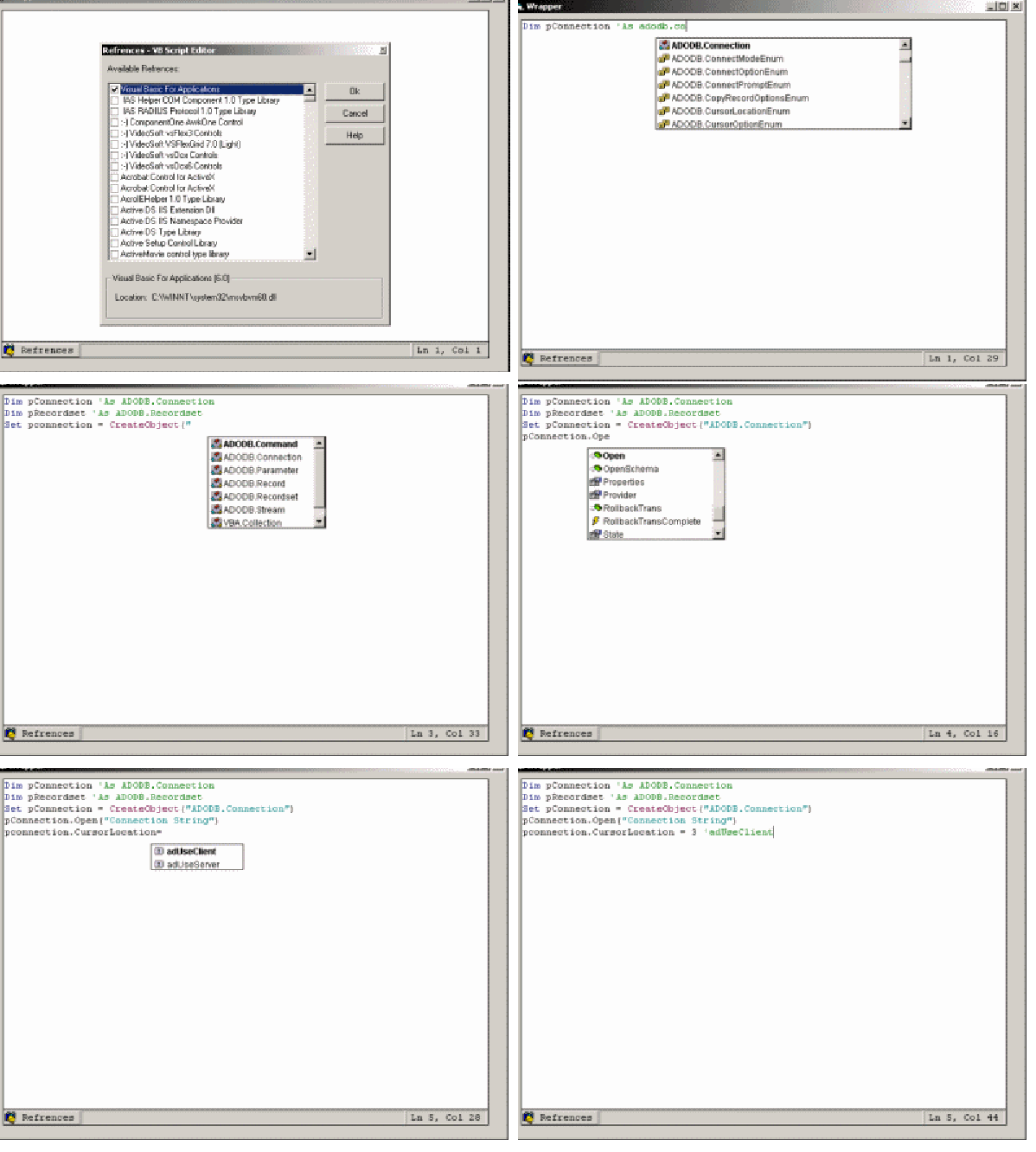
    VBScript Editor with IntelliSense

    Intellisense in scripting languages like VBScript is like a dream for script programmers. The goal of this project is to provide VBScript editor with intellisense like it was available in most of Microsoft language editors. The control uses the type library reference to explore the public methods and functions exposed in any com library. The script developer has to code like VB 6.0 language (Dim pConnection as ADODB.Connection) and the editor will automatically convert the code into VBScript.
    The complete VBScript alone with added references can be saved as an XML file. The Script property of control will return the pure VBScript which can be executed using the Microsoft Script Control.

    Source code at: