Rajnish Noonia

Category: Silverlight

  • Complex Layout in WPF and Silverlight

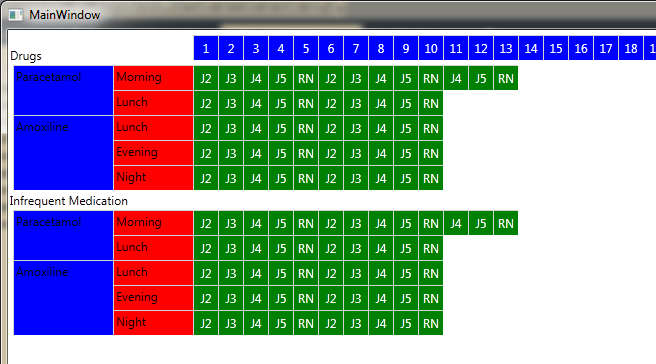
    WPF/Silverlight – Complex Layout -Simple solution

    Will write soon on this..

    Binding to XML WPF supports binding directly to XML objects, as demonstrate in this article.Like the ObjectDataProvider, the XmlDataProvider allows simple XAML based declaration of XML resources for use in your WPF application. – For details check source code.. Source code (Vs2010) for this sample is not currently available for download (being migrated to GitHub).

  • Styling Buttons in XAML

    XAML Button’s in 5 mins..

    XAML

    <Grid x:Name="LayoutRoot" Background="#FF54126A">
     <Grid  Height="87" Width="400" Margin="31,85.5,209,0" VerticalAlignment="Top" d:LayoutOverrides="Height" >
     <Border Background="#FF449712" Margin="1"  CornerRadius="5" BorderThickness="1">
     <Border.BorderBrush>
     <LinearGradientBrush EndPoint="0.5,1" StartPoint="0.5,0">
     <GradientStop Color="#6D000000" Offset="0"/>
     <GradientStop Color="Black" Offset="0.994"/>
     </LinearGradientBrush>
     </Border.BorderBrush>
     <Border.Effect>
     <BlurEffect Radius="2"/>
     </Border.Effect>
     </Border>
     <Border  CornerRadius="5" Margin="3" BorderThickness="0,2,0,0">
     <Border.Effect>
     <BlurEffect Radius="3"/>
     </Border.Effect>
     <Border.BorderBrush>
     <LinearGradientBrush EndPoint="0.5,1" StartPoint="0.5,0">
     <GradientStop Color="#00000000" Offset="1"/>
     <GradientStop Color="#D7FFFFFF"/>
     </LinearGradientBrush>
     </Border.BorderBrush>
     <Border.Background>
     <LinearGradientBrush EndPoint="0.5,1" StartPoint="0.5,0">
     <GradientStop Color="#1DB1B1B1" Offset="0.5"/>
     <GradientStop Offset="0.5"/>
     </LinearGradientBrush>
     </Border.Background>
     </Border>
     <TextBlock Text="Buy Now !" HorizontalAlignment="Center" VerticalAlignment="Center" Foreground="White" FontSize="40"  FontFamily="Segoe UI Symbol">
     <TextBlock.Effect>
     <DropShadowEffect BlurRadius="10" ShadowDepth="0"/>
     </TextBlock.Effect>
     </TextBlock>
     </Grid>
    
     <Grid  Height="87" Width="400" Margin="32,209.5,208,183.5" >
    
     <Border Background="#FF0C64CA" Margin="1"  CornerRadius="5" BorderThickness="1">
     <Border.BorderBrush>
     <LinearGradientBrush EndPoint="0.5,1" StartPoint="0.5,0">
     <GradientStop Color="#6D000000" Offset="0"/>
     <GradientStop Color="Black" Offset="0.994"/>
     </LinearGradientBrush>
     </Border.BorderBrush>
     <Border.Effect>
     <BlurEffect Radius="2"/>
     </Border.Effect>
     </Border>
     <Border  CornerRadius="5" Margin="3" BorderThickness="0,2,0,0">
     <Border.Effect>
     <BlurEffect Radius="2"/>
     </Border.Effect>
     <Border.BorderBrush>
     <LinearGradientBrush EndPoint="0.5,1" StartPoint="0.5,0">
     <GradientStop Color="#00000000" Offset="1"/>
     <GradientStop Color="#D7FFFFFF"/>
     </LinearGradientBrush>
     </Border.BorderBrush>
     <Border.Background>
     <LinearGradientBrush EndPoint="0.5,1" StartPoint="0.5,0">
     <GradientStop Color="#1DB1B1B1" Offset="0.5"/>
     <GradientStop Offset="0.5"/>
     </LinearGradientBrush>
     </Border.Background>
     </Border>
     <TextBlock Text="Download Trial !" HorizontalAlignment="Center" VerticalAlignment="Center" Foreground="White" FontSize="40"  FontFamily="Segoe UI Symbol">
     <TextBlock.Effect>
     <DropShadowEffect BlurRadius="10" ShadowDepth="0"/>
     </TextBlock.Effect>
     </TextBlock>
     </Grid>
    
     </Grid>
  • Building a Page-Flip Photo Album with Deep Zoom

    Book control is another excellent page flip control which allows you to add any silverlight element as book page.It supports page down and page up as bidiretional navigation keys.Demo application & source code is attached below.
    [silverlight: http://www.pixytech.com/rajnish/uploads/code/BookDemo.xap, 850, 650]

    The objective of this article is to create photo album application which allows user to add pictures just by drag and drop on album.The picture will be splitted into parts and uploaded on server where it is re-constructed and again processed into deep zoom meta file (on fly) and link to this picture will be then added into album.Photo album will have deep zoom enabled pages.

    I couldn’t get much time to finish this project & hence i would call this as beta source code which includes the full source code of Book control (page flip)

    Beta Source code for book control is available here

  • Creating a Custom XAP Loader Splash Screen

    [silverlight:http://www.pixytech.com/rajnish/uploads/code/Splash.xap,550, 550]

    The objective of this article is to create custom xap loader screen without any background image and code behind (pure XAML).In the final application version, download progress of root xap file will be shown in the sample screen above..

    Will write more on this article in next few days …

  • Silverlight for Symbian S60 devices

    Microsoft has released Silverlight platform design to work with Symbian S60 devices at the on MIX10 conference at Las Vegas.The plateform is now available for Nokia SymbianOS (S60 5th Edition) devices i.e. Nokia 5235, 5800 XpressMusic, Nokia N97 and Nokia N97 Mini Mobiles. I did some basic test with nokia 5235 and it runs with charm.

    The current Silverlight beta for Symbian comes in two forms – one as an installer for Symbian (S60 5th edition) devices and the second one in the form of a developer tools suite for developing Silverlight applications for Symbian devices including emulator etc.

    Silverlight includes a Runtime that is optimized to display content on memory-constrained devices.

    •  The ability to view Silverlight applications in the mobile browser.
    •  Tools to build Silverlight applications that target devices

    Microsoft has bought the Silverlight platform to a non-Microsoft mobile platform for the first time ever.

    In order to get started with Silverlight for Symbian, you will want to familiarize yourself with the platform capabilities.

    More resources are available on microsoft website.

    Days are not far when you will see silverlight on rest of consumer devices ..